
25 KiB
org-ql
<a href=https://alphapapa.github.io/dont-tread-on-emacs/><img src="images/dont-tread-on-emacs-150.png" align="right"></a>
org-ql is a lispy query language for Org files. It allows you to find Org entries matching certain criteria and return a list of them or perform actions on them. Commands are also provided which display a buffer with matching results, similar to an Org Agenda buffer.
Examples
More examples are available in /jiri/org-ql/src/commit/9c45a020c18c8382f014244afcfdf884f2136f90/examples.org.
  ;; Return a list of Org entry elements in the file "~/org/main.org"
  ;; which have the SOMEDAY to-do keyword, are tagged "Emacs", and have
  ;; priority B or higher.
  (org-ql "~/org/main.org"
    (and (todo "SOMEDAY")
         (tags "Emacs")
         (priority >= "B")))
  ;;=> ((headline (:raw-value "org-board" :begin 1220270 :end 1220403 ...)) ...)

  ;; Set the tag "Emacs" on every entry in the inbox file that mentions
  ;; "Emacs".  `org-ql-select' works like `org-ql' but is a function
  ;; rather than a macro.  The bare-string query "Emacs" is equivalent
  ;; to (regexp "Emacs").
  (org-ql-select "~/org/inbox.org"
    "Emacs"
    :action '(org-toggle-tag "Emacs" 'on))

  ;; Return a list of bills coming due, searching all Org Agenda files,
  ;; sorted by deadline.  Deadlines are compared with
  ;; `org-deadline-warning-days', which is implied by the plain `<=' in
  ;; the `deadline' predicate.  `org-ql-query' works like `org-ql-select'
  ;; but offers arguments named like SQL queries.
  (org-ql-query
    :select #'org-get-heading
    :from (org-agenda-files)
    :where '(and (not (done))
                 (tags "bills")
                 (deadline <=))
    :order-by 'deadline)
  ;;=> ("TODO Electric bill" "TODO Water bill")

  ;; If you kept a database of music in an Org file, you could run a
  ;; query like this to find tracks composed by Chopin that do not have
  ;; their key recorded in the database.  `org-ql-search' works like
  ;; `org-ql-select' and displays results in an agenda-like buffer:
  (org-ql-search "~/org/music.org"
    '(and (property "genre" "classical")
          (property "composer" "Chopin")
          (not (property "key"))))

  ;; Integrate `org-ql' into a custom Org Agenda command which inserts
  ;; an `org-ql' block before the regular agenda:
  (setq org-agenda-custom-commands
        '(("ces" "Custom: Agenda and Emacs SOMEDAY [#A] items"
           ((org-ql-block '(and (todo "SOMEDAY")
                                (tags "Emacs")
                                (priority "A")))
            (agenda)))))

  ;; Show a "stuck projects" view: tasks that are not done and have only
  ;; non-task children.
  (org-ql-search (org-agenda-files)
    '(and (todo)
          (children)
          (not (children (todo))))
    :title "Stuck Projects")
Installation
The package may be installed directly from MELPA or with other tools like Quelpa.
After installation. you can use commands like org-ql-search immediately.
To use the functions and macros in your own Elisp code, load the libraries org-ql and/or org-ql-agenda with e.g. (require 'org-ql).
Quelpa
Installing with Quelpa is easy:
- Install quelpa-use-package (which can be installed directly from MELPA).
- Add this form to your init file:
  (use-package org-ql
    :quelpa (org-ql :fetcher github :repo "alphapapa/org-ql"))
Usage
The functionality provided may be grouped by:
- Interactive commands
org-ql-search- Non-interactive functions and macros
org-ql(macro),org-ql-select(function),org-ql-query(function),org-ql-block(agenda function), andorg-ql-agenda(macro)
Alternatively, they may be grouped by:
- Showing an agenda-like view
org-ql-search(command),org-ql-block(agenda function), andorg-ql-agenda(macro)- Returning a list of matches or acting on them
org-ql(macro),org-ql-select(function), andorg-ql-query(function)
Feedback on these APIs is welcome. Eventually, after being tested and polished, they will be considered stable.
Commands
org-ql-search
Read QUERY and search with org-ql. Interactively, prompt for these variables:
BUFFERS-FILES: A list of buffers and/or files to search. Interactively, may also be:
buffer: search the current bufferall: search all Org buffersagenda: search buffers returned by the functionorg-agenda-files- An expression which evaluates to a list of files/buffers
- A space-separated list of file or buffer names
GROUPS: An org-super-agenda group set. See variable org-super-agenda-groups.
NARROW: When non-nil, don't widen buffers before searching. Interactively, with prefix, leave narrowed.
SORT: One or a list of org-ql sorting functions, like date or priority.
Press g to refresh the results buffer.
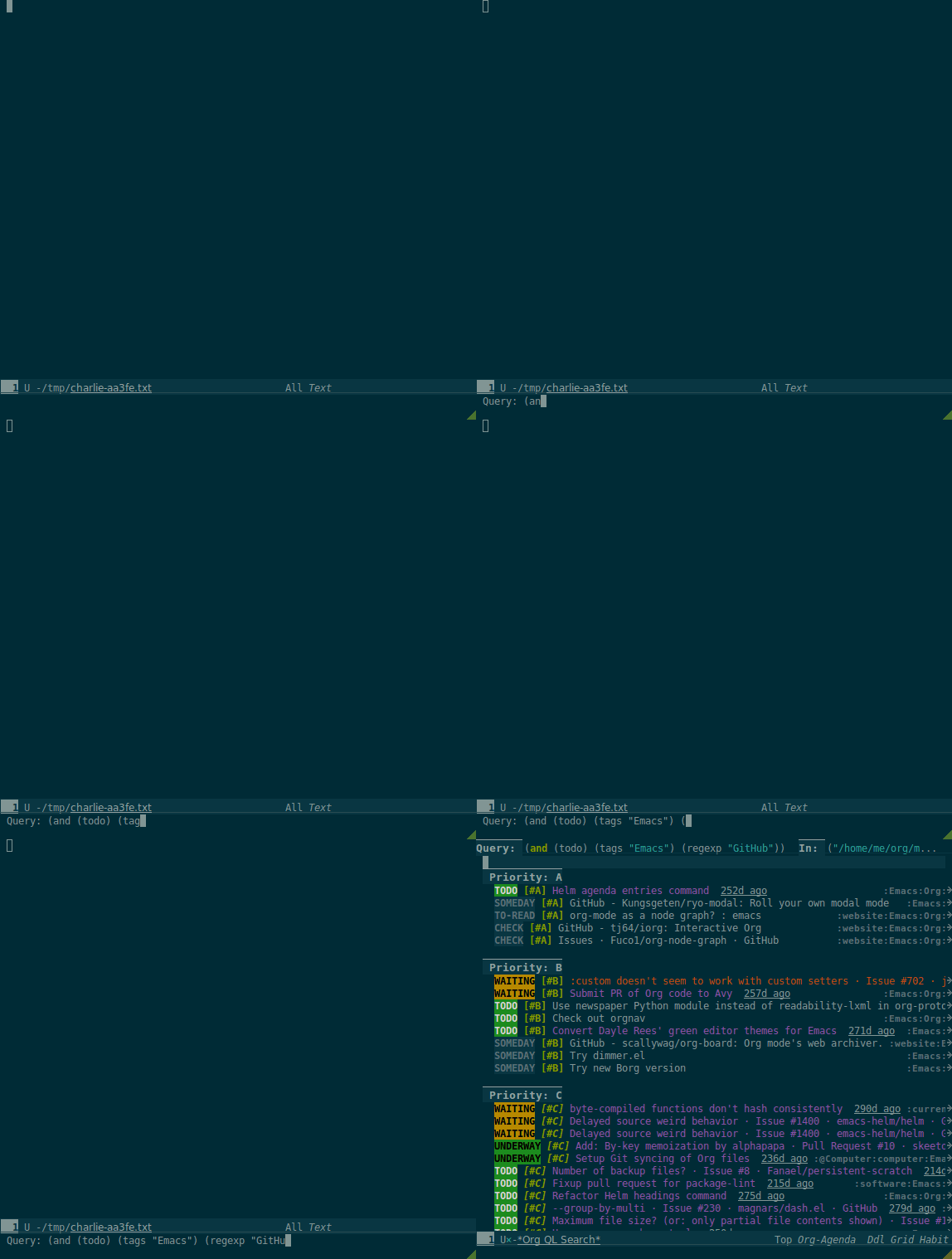
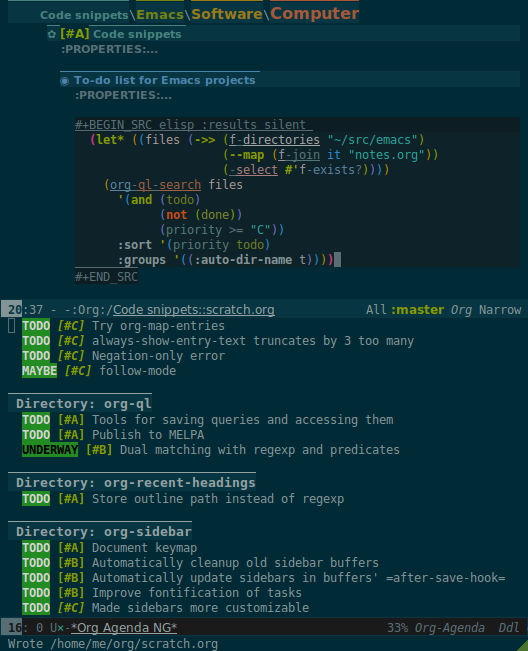
Here's an example of using it to generate an agenda-like view for certain files in a directory tree:
Queries
A query is a lisp form which may contain arbitrary lisp forms, as well as certain built-in predicates. It is byte-compiled into a predicate function which is tested with point on each heading in an Org buffer; when it returns non-nil, the heading matches the query.
Notes:
- Bare strings like
"string"are automatically converted to(regexp "string")predicates. - Standard numeric comparator function symbols (
<,<=,>,>=,=) need not be quoted when passed as an argument to these predicates. The resemblance to infix notation is coincidental. See examples in documentation.
Predicates
Arguments are listed next to predicate names, where applicable.
-
category (&optional categories) - Return non-nil if current heading is in one or more of
CATEGORIES(a list of strings). -
children (&optional query) - Return non-nil if current heading has direct child headings. If
QUERY, test it against child headings. This selector may be nested, e.g. to match grandchild headings. -
descendants (&optional query) - Return non-nil if current heading has descendant headings. If
QUERY, test it against descendant headings. This selector may be nested (if you can grok the nesting!). -
done - Return non-nil if entry's
TODOkeyword is inorg-done-keywords. -
habit - Return non-nil if entry is a habit.
-
heading (regexp) - Return non-nil if current entry's heading matches
REGEXP(a regexp string). -
level (level-or-comparator &optional level) - Return non-nil if current heading's outline level matches arguments. The following forms are accepted:
(level NUMBER): Matches if heading level isNUMBER.(level NUMBER NUMBER): Matches if heading level is equal to or between NUMBERs.(level COMPARATOR NUMBER): Matches if heading level compares toNUMBERwithCOMPARATOR.COMPARATORmay be<,<=,>, or>=. -
priority (&optional comparator-or-priority priority) - Return non-nil if current heading has a certain priority.
COMPARATOR-OR-PRIORITYshould be either a comparator function, like<=, or a priority string, like "A" (in which case (=will be the comparator). IfCOMPARATOR-OR-PRIORITYis a comparator,PRIORITYshould be a priority string. -
property (property &optional value) - Return non-nil if current entry has
PROPERTY(a string), and optionallyVALUE(a string). Note that property inheritance is currently not enabled for this predicate. If you need to test with inheritance, you could use a custom predicate form, like(org-entry-get (point) "PROPERTY" 'inherit). -
regexp (regexp) - Return non-nil if current entry matches
REGEXP(a regexp string). -
tags (&optional tags) - Return non-nil if current heading has one or more of
TAGS(a list of strings). -
todo (&optional keywords) - Return non-nil if current heading is a
TODOitem. WithKEYWORDS, return non-nil if its keyword is one ofKEYWORDS(a list of strings). When called without arguments, only matches non-done tasks (i.e. does not match keywords inorg-done-keywords).
Date/time selectors
All of these selectors take optional keyword arguments :from, :to:, and :on. If :from, return non-nil if entry has a timestamp on or after :from. If :to, return non-nil if entry has a timestamp on or before :to. If :on, return non-nil if entry has a timestamp on date :on. Argument values should be either ts structs, or strings parseable by parse-time-string which may omit the time value.
-
clocked - Return non-nil if current entry was clocked in given period. If no arguments are specified, return non-nil if entry was clocked at any time. Note: Clock entries are expected to be clocked out. Currently clocked entries (i.e. with unclosed timestamp ranges) are ignored.
-
closed - Return non-nil if current entry was closed in given period. If no arguments are specified, return non-nil if entry was closed at any time.
-
deadline - Return non-nil if current entry has deadline in given period. If no arguments are specified, return non-nil if entry has any deadline.
-
planning - Return non-nil if current entry has planning timestamp in given period (i.e. its deadline, scheduled, or closed timestamp). If no arguments are specified, return non-nil if entry is scheduled at any time.
-
scheduled - Return non-nil if current entry is scheduled in given period. If no arguments are specified, return non-nil if entry is scheduled at any time.
-
ts - Return non-nil if current entry has a timestamp in given period. If no arguments are specified, return non-nil if entry has any timestamp.
-
ts-active - Like
ts, but only matches active timestamps. -
ts-a - Like
ts, but only matches active timestamps. -
ts-inactive - Like
ts, but only matches inactive timestamps. -
ts-i - Like
ts, but only matches inactive timestamps.
Functions / Macros
Agenda-like views
Function: org-ql-block
For use as a custom agenda block type in org-agenda-custom-commands. For example, you could define a custom series command like this, which would list all priority A items tagged Emacs with to-do keyword SOMEDAY, followed by the standard agenda view, in a single buffer:
  (setq org-agenda-custom-commands
        '(("ces" "Custom: Agenda and Emacs SOMEDAY [#A] items"
           ((org-ql-block '(and (todo "SOMEDAY")
                                (tags "Emacs")
                                (priority "A")))
            (agenda)))))
Which would be equivalent to a tags-todo search like this:
  (setq org-agenda-custom-commands
        '(("ces" "Custom: Agenda and Emacs SOMEDAY [#A] items"
           ((tags-todo "PRIORITY=\"A\"+Emacs/!SOMEDAY")
            (agenda)))))
However, the org-ql-block version runs in about 1/5th the time.
Macro: org-ql-agenda
This macro is like org-ql, but it presents matching entries in an Agenda-like view. It's compatible with org-super-agenda, which provides grouping. For example:
  (org-ql-agenda "~/src/emacs/org-super-agenda/test/test.org"
    (and (or (date = today)
             (deadline <=)
             (scheduled <= today))
         (not (done)))
    :title "My Agenda View"
    ;; The `org-super-agenda-groups' setting is used automatically when set, or it
    ;; may be overriden by specifying it here:
    :super-groups ((:name "Bills"
                          :tag "bills")
                   (:todo ("SOMEDAY" "TO-READ" "CHECK" "TO-WATCH" "WATCHING")
                          :order 7)
                   (:name "Personal"
                          :habit t
                          :tag "personal"
                          :order 3)
                   (:todo "WAITING"
                          :order 6)
                   (:priority "A" :order 1)
                   (:priority "B" :order 2)
(:priority "C" :order 2)))Which presents this buffer:
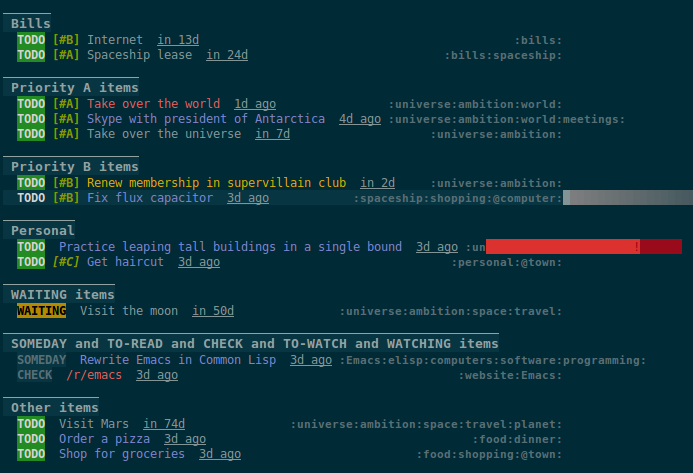
Note: The view buffer is currently put in org-agenda-mode, which means that some Org Agenda commands work, such as jumping to entries and changing item priorities (without necessarily updating the view). This feature is experimental and not guaranteed to work correctly with all commands. (It works to the extent it does because the appropriate text properties are placed on each item, imitating an Agenda buffer.)
Here are some other examples:
  ;; Show an agenda-like view of items in "~/org/main.org" with TODO and SOMEDAY keywords which are
  ;; tagged "computer" or "Emacs" and in the category "main":
  (org-ql-agenda "~/org/main.org"
    (and (todo "TODO" "SOMEDAY")
         (tags "computer" "Emacs")
         (category "main")))

  ;; Show an agenda-like view of all habits in all agenda files:
  (org-ql-agenda
    (habit))

  ;; Show an agenda-like view similar to a "traditional" Org agenda.
  (org-ql-agenda
    (or (habit)
        (date = today)
        (deadline <=)
        (scheduled <= today)
        (and (todo "DONE" "CANCELLED")
             (closed = today))))
Listing / acting-on results
Function: org-ql-select
Arguments: (buffers-or-files query &key action narrow sort)
Return items matching QUERY in BUFFERS-OR-FILES.
BUFFERS-OR-FILES is a one or a list of files and/or buffers.
QUERY is an org-ql query sexp (quoted, since this is a function).
ACTION is a function which is called on each matching entry with point at the beginning of its heading. It may be:
elementor nil: Equivalent toorg-element-headline-parser.element-with-markers: Equivalent to callingorg-element-headline-parser, with markers added usingorg-ql--add-markers. Suitable for formatting withorg-ql-agenda--format-element, allowing insertion into an Org Agenda-like buffer.- A sexp, which will be byte-compiled into a lambda function.
- A function symbol.
If NARROW is non-nil, buffers are not widened (the default is to widen and search the entire buffer).
SORT is either nil, in which case items are not sorted; or one or a list of defined org-ql sorting methods (date, deadline, scheduled, todo, or priority); or a user-defined comparator function that accepts two items as arguments and returns nil or non-nil.
Examples:
  ;; Return list of to-do headings in inbox file with tags and to-do keywords:
  (org-ql-select "~/org/inbox.org"
    '(todo)
    :action #'org-get-heading)
  ;; => ("TODO Practice leaping tall buildings in a single bound  :personal:" ...)

  ;; Without tags and to-do keywords:
  (org-ql-select "~/org/inbox.org"
    '(todo)
    :action '(org-get-heading t t))
  ;; => ("Practice leaping tall buildings in a single bound" ...)

  ;; Return WAITING heading elements in agenda files:
  (org-ql-select (org-agenda-files)
    '(todo "WAITING")
    :action 'element)
  ;; => ((headline (:raw-value "Visit the moon" ...) ...) ...)

  ;; Since `element' is the default for ACTION, it may be omitted:
  (org-ql-select (org-agenda-files)
    '(todo "WAITING"))
  ;; => ((headline (:raw-value "Visit the moon" ...) ...) ...)
Function: org-ql-query
Arguments: (&key (select 'element-with-markers) from where order-by narrow)
Like org-ql-select, but arguments are named more like a SQL query.
SELECTcorresponds to theorg-ql-selectargumentACTION.FROMcorresponds to theorg-ql-selectargumentBUFFERS-OR-FILES.WHEREcorresponds to theorg-ql-selectargumentQUERY.ORDER-BYcorresponds to theorg-ql-selectargumentSORT, which see.NARROWcorresponds to theorg-ql-selectargumentNARROW.
Examples:
  ;; Return list of to-do headings in inbox file with tags and to-do keywords:
  (org-ql-query
    :select #'org-get-heading
    :from "~/org/inbox.org"
    :where '(todo))
  ;; => ("TODO Practice leaping tall buildings in a single bound  :personal:" ...)

  ;; Without tags and to-do keywords:
  (org-ql-query
    :select '(org-get-heading t t)
    :from "~/org/inbox.org"
    :where '(todo))
  ;; => ("Practice leaping tall buildings in a single bound" ...)

  ;; Return WAITING heading elements in agenda files:
  (org-ql-query
    :select 'element
    :from (org-agenda-files)
    :where '(todo "WAITING"))
  ;; => ((headline (:raw-value "Visit the moon" ...) ...) ...)

  ;; Since `element' is the default for SELECT, it may be omitted:
  (org-ql-query
    :from (org-agenda-files)
    :where '(todo "WAITING"))
  ;; => ((headline (:raw-value "Visit the moon" ...) ...) ...)
Macro: org-ql
Arguments: (buffers-or-files query &key sort narrow markers action)
Expands into a call to org-ql-select with the same arguments. For convenience, arguments should be unquoted.
Changelog
Note: Breaking changes may be made before version 1.0, but in the event of major changes, attempts at backward compatibility will be made with obsolescence declarations, translation of arguments, etc. Users who need stability guarantees before 1.0 may choose to use tagged stable releases.
0.2-pre
Added
- Function
org-ql-query, likeorg-ql-selectbut with arguments named more like a SQL query. - Bare strings like
"string"can be used in queries, which are converted to(regexp "string")automatically. - Selector
(regexp)accepts multiple regexps to test. - Macro
org-qland functionsorg-ql-queryandorg-ql-selectnow also accept a comparator function in their:sortargument. - Function
org-ql-block, which works as an Org Agenda series/composite/block command, usable in custom agenda commands defined in variableorg-agenda-custom-commands. (Inspired by Benson Chu's config.) - Function
org-ql-agenda--agendaoptionally takes a list of entries as an argument. - Selectors
ts-aandts-i, aliases forts-activeandts-inactive. - Selector
tsnow accepts a:typeargument. - Face
org-ql-agenda-due-date. - Selectors
(children)and(descendants). - Function
org-ql-searchand macroorg-ql-agendaaccept a:titleargument, which is displayed in the header.
Changed
- Function
org-ql-queryrenamed toorg-ql-select.org-ql-querynow refers to a new function. - Macro
org-qlno longer accepts a:markersargument. Instead, use argument:action element-with-markers. See functionorg-ql-select, whichorg-qlcalls. - Selector
(todo)no longer matches "done" keywords when used without arguments (i.e. the ones in variableorg-done-keywords).
Removed
- Selector
(date), replaced by(ts).
Fixed
- Handle date ranges in date-based selectors. (Thanks to Cody Goodman, Samuel W. Flint, and Vikas Rawal.)
- Don't overwrite bindings in
org-agenda-mode-map. - Don't search buffers without headings, and show a message if the user attempts it.
- Don't search hidden/special buffers.
Compatibility
- Fixes for compatibility with Org 9.2. (Thanks to Ataias Pereira Reis and Daniel Kraus.)
Internal
0.1
First tagged release.
Notes
Comparison with Org Agenda searches
Of course, queries like these can already be written with Org Agenda searches, but the syntax can be complex. For example, this query would be difficult to write in a standard Org Agenda search, because it matches against a to-do keyword and a plain-text search. As described in the advanced searching tutorial, it would require using org-search-view with a query with specific regular expression syntax, like this:
+lisp +{^\*+\s-+TO-READ\s-}
But with org-ql-agenda, you would write:
  (org-ql-agenda
    (and (regexp "lisp")
         (todo "TO-READ")))
org-sidebar
This package is used by org-sidebar, which presents a customizable agenda-like view in a sidebar window.
License
GPLv3