 f4918b19dc
It's finally time to merge this branch, which adds non-sexp queries,
updates the readme, and a few other things.

Squashed commit of the following:

commit ee54e31dfa2c3335e4ef5498fc9714ddc093968b
Author: Adam Porter <adam@alphapapa.net>
Date:   Sun Oct 6 00:10:19 2019 -0500

    WIP: Depend-on/Require dash-functional

commit 42f6a47d86dfb7f8e96f3b1822e17a3eed825897
Author: Adam Porter <adam@alphapapa.net>
Date:   Sat Oct 5 23:45:06 2019 -0500

    WIP: Update docs

commit eb56e46ed8cd9ad6874dc955375be5efadb4fcf2
Author: Adam Porter <adam@alphapapa.net>
Date:   Sat Oct 5 22:04:24 2019 -0500

    WIP: Add demo script

commit cdd394f4865cd49791b2fbebb1913d9210aeaf35
Author: Adam Porter <adam@alphapapa.net>
Date:   Sat Oct 5 20:24:44 2019 -0500

    WIP: Update demo GIF

commit 7f470a7c3c7612b7718dc26044069dc2a6afdff3
Author: Adam Porter <adam@alphapapa.net>
Date:   Sat Oct 5 13:02:09 2019 -0500

    WIP: (property) Convert keyword properties to strings

    I'm a little uncomfortable with how query parsing and processing is
    getting spread out among 2 or 3 functions, but handling this in the
    plain-query parsing function would require uglier special-case
    workarounds, so this seems like the best solution for now.

commit 4e494a03f29a1d0068daa9cddf095dba15252133
Author: Adam Porter <adam@alphapapa.net>
Date:   Fri Oct 4 16:25:00 2019 -0500

    WIP: Handle query errors, move code, add tags-all, tags& aliases

    This prevents query compilation errors from displaying a warning
    buffer, especially in the Helm command.

    Close to done, but now need to figure out the "property:" predicate,
    because its value argument looks like an alternative property rather
    than a value, e.g. "property:agenda-group,plans" in which "plans" is
    the value for the property "agenda-group".

commit 9d8222d8fa9a584b1ee648c5aa38999200e7c54f
Author: Adam Porter <adam@alphapapa.net>
Date:   Thu Oct 3 22:18:29 2019 -0500

    WIP: Rewrite (priority) predicate to accept multiple priorities

    This commit also fixes a latent bug in the preamble for (priority), which
    wasn't being hit because the query (priority) was being rewritten by
    pre-process to (priority '>= C).

commit 4900470ba52b0fcf4786ab857e316403dec00481
Author: Adam Porter <adam@alphapapa.net>
Date:   Thu Oct 3 20:41:54 2019 -0500

    WIP: More documentation

commit 5041a901f6c1071a4233e5671a0926e65e29a5c0
Author: Adam Porter <adam@alphapapa.net>
Date:   Thu Oct 3 12:30:50 2019 -0500

    WIP: Mention query types for commands

commit bb2d18532cb972a54b5b9056b76b0582eb4cad03
Author: Adam Porter <adam@alphapapa.net>
Date:   Thu Oct 3 11:01:56 2019 -0500

    WIP: Remove old code

commit 8de048e531bfa9ba7058e7d540aae2d332f9be68
Author: Adam Porter <adam@alphapapa.net>
Date:   Thu Oct 3 11:01:03 2019 -0500

    WIP: TODO done

commit 6a38fc845aeb05fe3f03174c04a7011830873705
Author: Adam Porter <adam@alphapapa.net>
Date:   Thu Oct 3 10:59:45 2019 -0500

    WIP: Tidy docstrings

commit 04d0c254fc8694b1363c91a1691f3303fcf7755a
Author: Adam Porter <adam@alphapapa.net>
Date:   Thu Oct 3 10:58:21 2019 -0500

    WIP: Document plain queries

commit 23dcc9bad4a8e6660e48632a20a04adb2654e20d
Author: Adam Porter <adam@alphapapa.net>
Date:   Thu Oct 3 10:27:41 2019 -0500

    WIP: Move ts aliases into defpreds, improve docstrings and comments

commit 6ef710f25bbd430b56ce205b8f314b17cd9ac7c3
Author: Adam Porter <adam@alphapapa.net>
Date:   Thu Oct 3 10:11:17 2019 -0500

    Tidy: Whitespace

commit 1022c4b36fb03a6724d97ba4dd1b5bb68025ed7b
Author: Adam Porter <adam@alphapapa.net>
Date:   Thu Oct 3 10:01:53 2019 -0500

    WIP: (org-ql-search) Accept plain queries

    This way, helm-org-ql and org-ql-search accept queries in the same
    format.

commit 1903e8f5684269c272a2ff3984d4d262f41323c5
Author: Adam Porter <adam@alphapapa.net>
Date:   Thu Oct 3 09:22:35 2019 -0500

    WIP: Add more plain-query tests

commit 9d58e3395e871f3536296ccfbb3901f98416bd9a
Author: Adam Porter <adam@alphapapa.net>
Date:   Thu Oct 3 09:17:07 2019 -0500

    WIP: Return boolean from --plain-query, and only when needed

commit 3770e18e68eaf776aef6fbb94e6ac5648c869c12
Author: Adam Porter <adam@alphapapa.net>
Date:   Thu Oct 3 08:59:55 2019 -0500

    WIP: Parse numbers in key/value args

    e.g. "ts-a:on=-1" for yesterday, or "ts:on=0" or "ts:on=today" for
    today.

commit 0f2b71bb869980f413c7366d1b15fa35f3f6a1c5
Author: Adam Porter <adam@alphapapa.net>
Date:   Thu Oct 3 08:59:43 2019 -0500

    WIP: Rename plain-query function

commit be410a36f4a1c043de24a2d0d2fbbe22135c3385
Author: Adam Porter <adam@alphapapa.net>
Date:   Wed Oct 2 19:21:07 2019 -0500

    WIP: Reverse query properly

    PEG returns queries backwards for some reason, so reverse them back to
    the order they were input in.

commit c184091ac2e96a76696055509ca6245e9a020b03
Author: Adam Porter <adam@alphapapa.net>
Date:   Wed Oct 2 19:17:20 2019 -0500

    WIP: Fix previous commit

    Something weird happens when defining the function that's defined by
    the macro in the eval-when block: It seems that I have to eval it
    twice before it takes effect.  So when I made the previous commit, the
    function defined at the time was working properly, but the function
    defined at the time was apparently not what was written in the file,
    but some intermediate state that had been written before, so I don't
    even know what the code was that was working properly.

    After some more fiddling, this seems to work properly.

commit 4e7288d494c6cfe69f82f3aea4b88feced7232f7
Author: Adam Porter <adam@alphapapa.net>
Date:   Wed Oct 2 18:42:59 2019 -0500

    WIP: Handle keyword/value queries

commit f603d199f47c1115cf11f8661c19c73f056b414d
Author: Adam Porter <adam@alphapapa.net>
Date:   Tue Oct 1 16:45:33 2019 -0500

    WIP: Define pred aliases and input-query function with macros

commit 217ef7dff13e8464baaa50539c82843e48bc3fe8
Author: Adam Porter <adam@alphapapa.net>
Date:   Tue Oct 1 16:16:04 2019 -0500

    WIP: Tidy: Don't quote the lambda

    I don't even know why I did that.

commit 3130f6519d7c21e47a026404e3929f118b003092
Author: Adam Porter <adam@alphapapa.net>
Date:   Fri Sep 27 23:20:50 2019 -0500

    WIP: Parsing with peg

    Seems to be working pretty well.

commit 0762825c7ba8026768aec74b4fffd32b8530c42c
Author: Adam Porter <adam@alphapapa.net>
Date:   Tue Sep 10 16:17:50 2019 -0500

    WIP: Rewriting Helm queries

    Some people are unaccustomed to parentheses, so we'll try to
    accommodate them.
|
||
|---|---|---|
| examples | ||
| images | ||
| tests | ||
| .gitignore | ||
| Cask | ||
| examples.org | ||
| helm-org-ql.el | ||
| LICENSE | ||
| Makefile | ||
| makem.sh | ||
| notes.org | ||
| org-ql-search.el | ||
| org-ql-view.el | ||
| org-ql.el | ||
| README.org | ||
org-ql
<a href=https://alphapapa.github.io/dont-tread-on-emacs/><img src="images/dont-tread-on-emacs-150.png" align="right"></a>
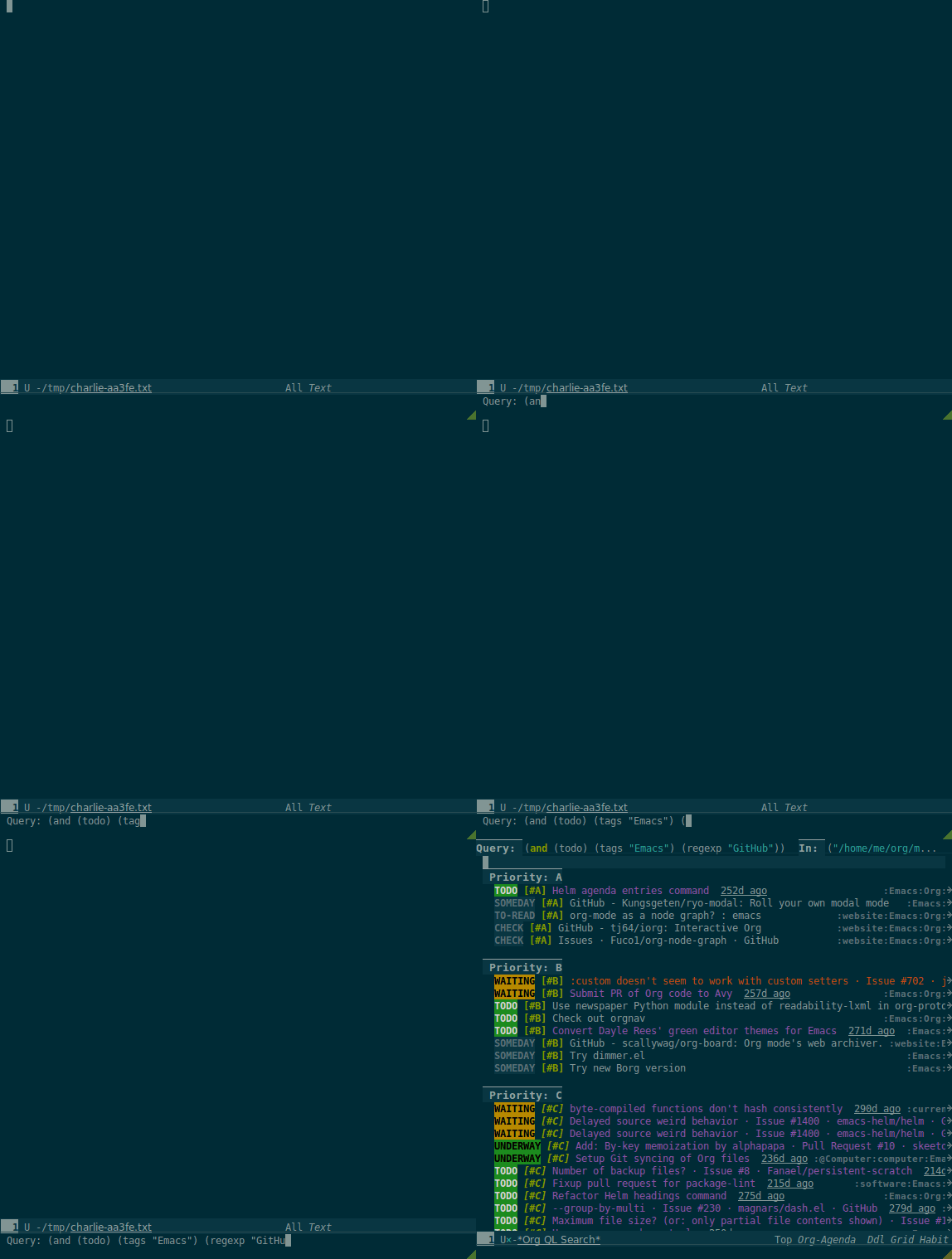
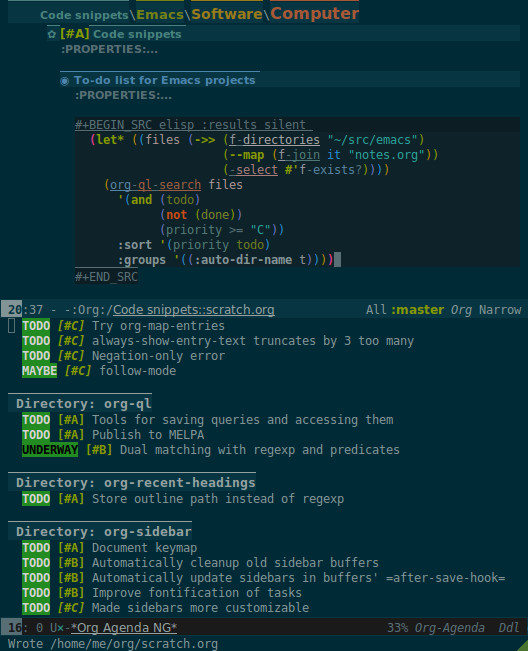
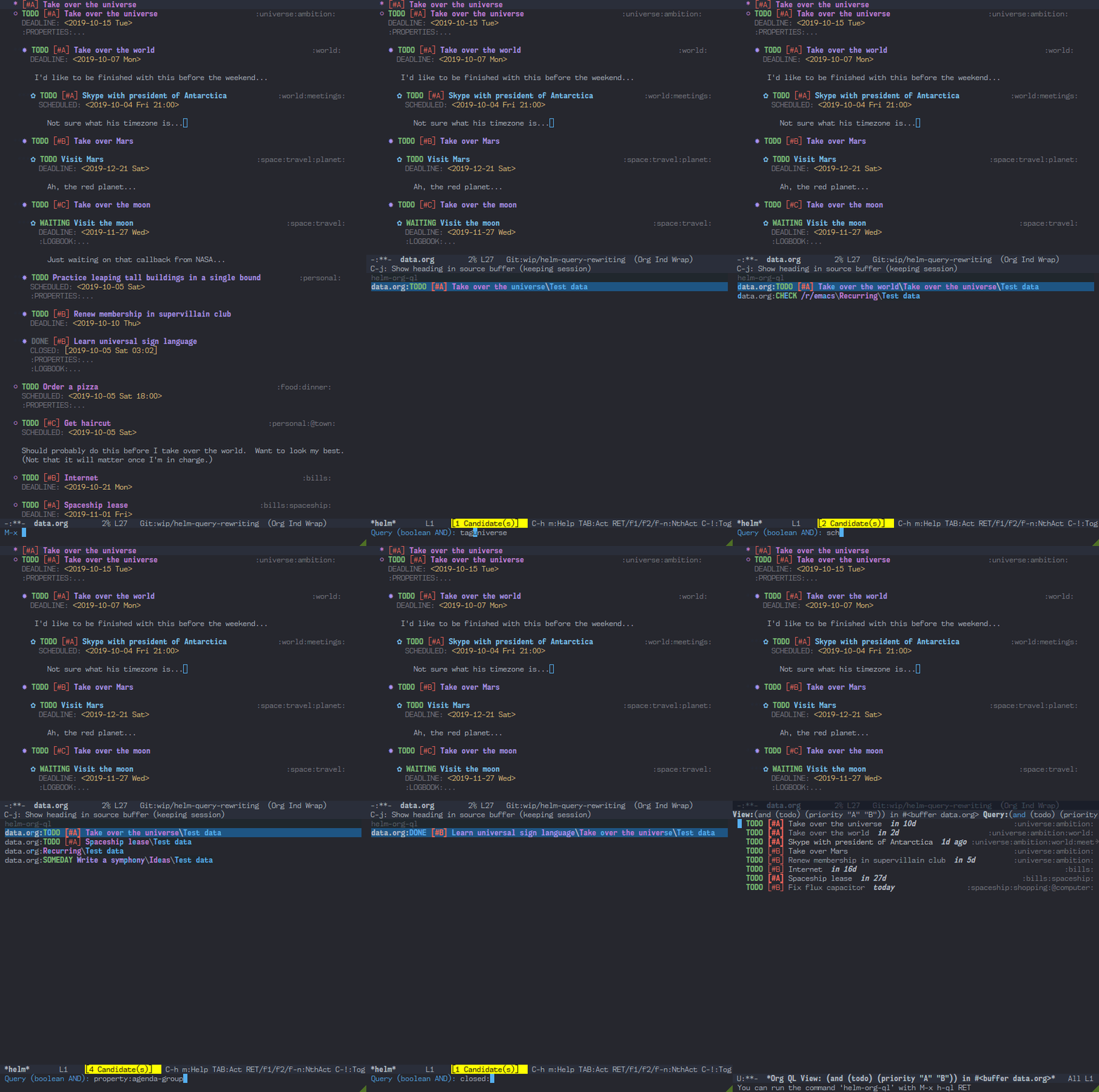
This package provides a query language for Org files. It offers two syntax styles: Lisp-like sexps and search engine-like keywords.
It includes three libraries: The org-ql library is flexible and may be used as a backend for other tools. The libraries org-ql-search and helm-org-ql provide interactive search commands and saved views.
Screenshots
Installation
The package may be installed directly from MELPA or with other tools like Quelpa.
After installation, you can use the commands without additional configuration. Note: The command helm-org-ql only works if the package helm-org is installed; Helm is not a dependency of this package, so it's not automatically installed.
To use the functions and macros in your own Elisp code, use libraries org-ql and org-ql-view.
Quelpa
Installing with Quelpa is easy:
- Install quelpa-use-package (which can be installed directly from MELPA).
- Add this form to your init file:
  (use-package org-ql
    :quelpa (org-ql :fetcher github :repo "alphapapa/org-ql"))
Usage
These commands and functions are included:
-
Showing an agenda-like view:
org-ql-search(command)org-ql-view(command)org-ql-view-sidebar(command)org-ql-block(agenda block function)
-
Showing a tree in a buffer:
org-ql-sparse-tree(command)
-
Showing results with Helm:
helm-org-ql(command)
-
Returning a list of matches or acting on them:
org-ql(macro)org-ql-select(function)org-ql-query(function)
Feedback on these APIs is welcome. Eventually, after being tested and polished, they will be considered stable.
Lisp code examples are in /jiri/org-ql/src/commit/f4918b19dc8a3b109e06543faca1892fd68da59d/examples.org.
Commands
org-ql-search
Note: This command supports both sexp queries and non-sexp queries.
Read QUERY and search with org-ql. Interactively, prompt for these variables:
BUFFERS-FILES: A list of buffers and/or files to search. Interactively, may also be:
buffer: search the current bufferall: search all Org buffersagenda: search buffers returned by the functionorg-agenda-files- An expression which evaluates to a list of files/buffers
- A space-separated list of file or buffer names
GROUPS: An org-super-agenda group set. See variable org-super-agenda-groups.
NARROW: When non-nil, don't widen buffers before searching. Interactively, with prefix, leave narrowed.
SORT: One or a list of org-ql sorting functions, like date or priority.
Bindings: Keys bound in results buffer.
g: Refresh results.C-x C-s: Save query to variableorg-ql-views(accessible with commandorg-ql-view).
Note: The view buffer is currently put in org-agenda-mode, which means that some Org Agenda commands work, such as jumping to entries and changing item priorities (without necessarily updating the view). This feature is experimental and not guaranteed to work correctly with all commands. (It works to the extent it does because the appropriate text properties are placed on each item, imitating an Agenda buffer.)
helm-org-ql
Note: This command uses non-sexp queries.
This command displays matches with Helm. Note: Helm is not a package dependency, so this command only works if the package helm-org is installed.
- Press
C-x C-sin the Helm session to save the results to anorg-ql-searchbuffer.
org-ql-view
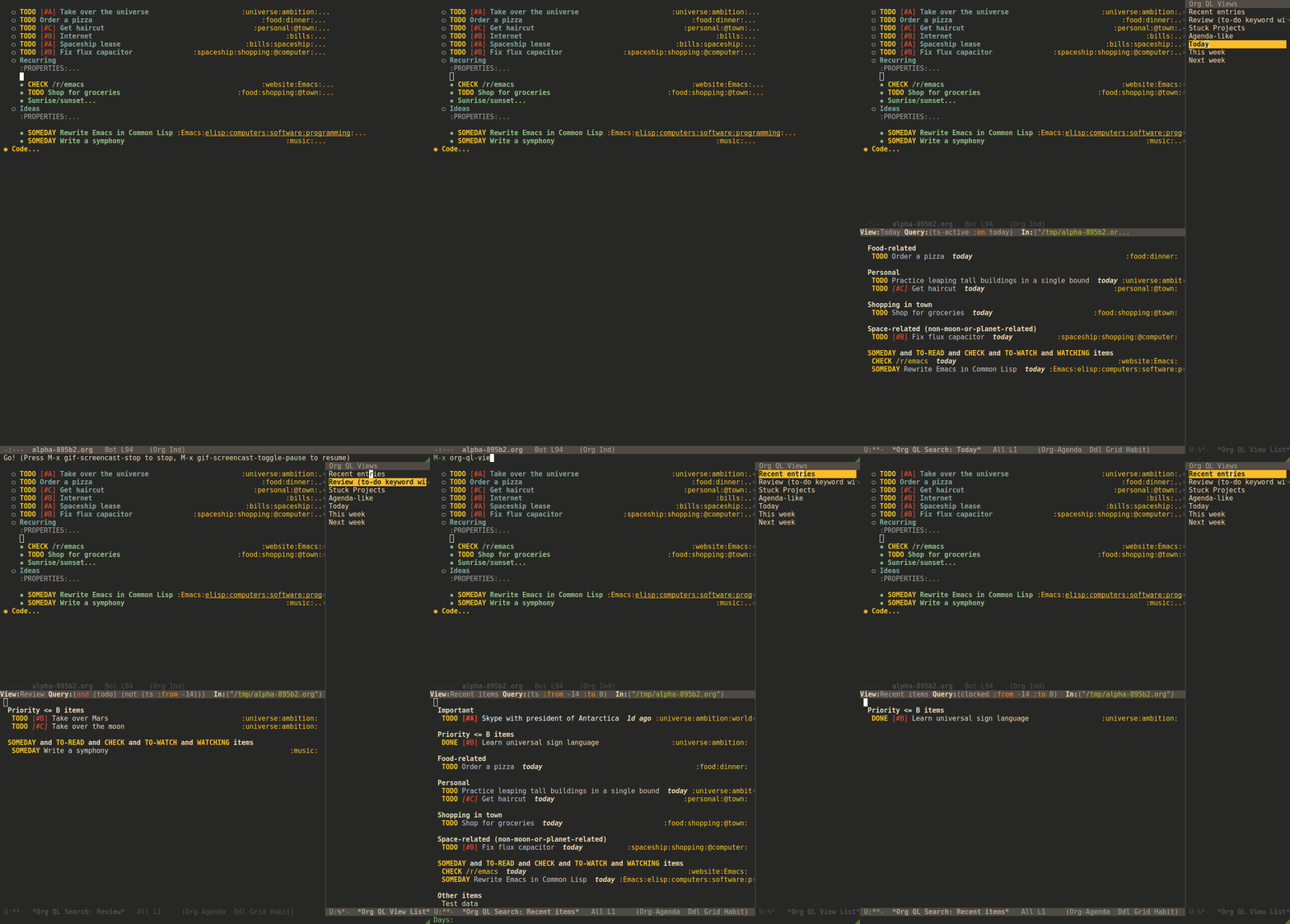
Choose and display a view stored in org-ql-views.
org-ql-view-sidebar
Show a sidebar window listing views stored in org-ql-views for easy access. In the sidebar, press RET or mouse-1 to show the view at point, and press c to customize the view at point.
org-ql-view-recent-items
Show items in FILES from last DAYS days with timestamps of TYPE. TYPE may be ts, ts-active, ts-inactive, clocked, closed, deadline, planning, or scheduled. FILES defaults to those returned by the function org-agenda-files.
org-ql-sparse-tree (query &key keep-previous (buffer (current-buffer)))
Show a sparse tree for QUERY in BUFFER and return number of results. The tree will show the lines where the query matches, and any other context defined in org-show-context-detail, which see.
QUERY is an org-ql query sexp (quoted, since this is a function). BUFFER defaults to the current buffer. When KEEP-PREVIOUS is non-nil (interactively, with prefix), the outline is not reset to the overview state before finding matches, which allows stacking calls to this command. Runs org-occur-hook after making the sparse tree.
Queries
An org-ql query is a lisp form which may contain arbitrary lisp forms, as well as certain built-in predicates. It is byte-compiled into a predicate function which is tested with point on each heading in an Org buffer; when it returns non-nil, the heading matches the query.
Notes:
- Bare strings like
"string"are automatically converted to(regexp "string")predicates. - Standard numeric comparator function symbols (
<,<=,>,>=,=) need not be quoted when passed as an argument to predicates which accept them. The resemblance to infix notation is coincidental.
Non-sexp query syntax
The command org-ql-search also accepts, and the command helm-org-ql only accepts, an alternative, non-sexp query syntax. The syntax is simple, and a few examples of queries in both syntaxes should suffice. By default, when multiple predicates are used, they are combined with boolean and.
| Sexp syntax | Non-sexp syntax |
|---|---|
(todo) |
todo: |
(todo "SOMEDAY") |
todo:SOMEDAY |
(todo "SOMEDAY" "WAITING") |
todo:SOMEDAY,WAITING |
(ts :on today) |
ts:on=today |
(ts-active :from "2017-01-01" :to "2018-01-01") |
ts-active:from=2017-01-01,to=2018-01-01 |
(clocked :on -1) |
clocked:on=-1 |
(heading "quoted phrase" "word") |
heading:"quoted phrase",word |
(and (tags "book" "books") (priority "A")) |
tags:book,books priority:A |
(priority >= B) |
priority:A,B |
Note that the priority predicate does not support comparators in the non-sexp syntax, so multiple priorities should be passed instead, as seen in the last example.
Predicates
Arguments are listed next to predicate names, where applicable.
-
category (&optional categories) - Return non-nil if current heading is in one or more of
CATEGORIES(a list of strings). -
children (&optional query) - Return non-nil if current heading has direct child headings. If
QUERY, test it against child headings. This selector may be nested, e.g. to match grandchild headings. -
descendants (&optional query) - Return non-nil if current heading has descendant headings. If
QUERY, test it against descendant headings. This selector may be nested (if you can grok the nesting!). -
done - Return non-nil if entry's
TODOkeyword is inorg-done-keywords. -
habit - Return non-nil if entry is a habit.
-
heading (&rest regexps) - Return non-nil if current entry's heading matches all
REGEXPS(regexp strings). -
level (level-or-comparator &optional level) - Return non-nil if current heading's outline level matches arguments. The following forms are accepted:
(level NUMBER): Matches if heading level isNUMBER.(level NUMBER NUMBER): Matches if heading level is equal to or between NUMBERs.(level COMPARATOR NUMBER): Matches if heading level compares toNUMBERwithCOMPARATOR.COMPARATORmay be<,<=,>, or>=. -
path (&rest regexps) - Return non-nil if current heading's buffer's filename path matches any of
REGEXPS(regexp strings). Without arguments, return non-nil if buffer is file-backed. -
priority (&optional comparator-or-priority priority) - Return non-nil if current heading has a certain priority.
COMPARATOR-OR-PRIORITYshould be either a comparator function, like<=, or a priority string, like "A" (in which case (=will be the comparator). IfCOMPARATOR-OR-PRIORITYis a comparator,PRIORITYshould be a priority string. If both arguments are nil, return non-nil if heading has any defined priority. -
property (property &optional value) - Return non-nil if current entry has
PROPERTY(a string), and optionallyVALUE(a string). Note that property inheritance is currently not enabled for this predicate. If you need to test with inheritance, you could use a custom predicate form, like(org-entry-get (point) "PROPERTY" 'inherit). -
regexp (&rest regexps) - Return non-nil if current entry matches all of
REGEXPS(regexp strings). Matches against entire entry, from beginning of its heading to the next heading. -
tags (&optional tags) - Return non-nil if current heading has one or more of
TAGS(a list of strings). Tests both inherited and local tags. -
tags-inherited (&optional tags) -
Return non-nil if current heading's inherited tags include one or more of
TAGS(a list of strings). If TAGS is nil, return non-nil if heading has any inherited tags.- Aliases:
inherited-tags,tags-i,itags.
- Aliases:
-
tags-local (&optional tags) -
Return non-nil if current heading's local tags include one or more of
TAGS(a list of strings). If TAGS is nil, return non-nil if heading has any local tags.- Aliases:
local-tags,tags-l,ltags.
- Aliases:
-
tags-all (tags) -
Return non-nil if current heading includes all of
TAGS. Tests both inherited and local tags.- Aliases:
tags&.
- Aliases:
-
todo (&optional keywords) - Return non-nil if current heading is a
TODOitem. WithKEYWORDS, return non-nil if its keyword is one ofKEYWORDS(a list of strings). When called without arguments, only matches non-done tasks (i.e. does not match keywords inorg-done-keywords).
Date/time predicates
All of these predicates take optional keyword arguments :from, :to:, and :on:
- If
:from, return non-nil if entry has a timestamp on or after:from. - If
:to, return non-nil if entry has a timestamp on or before:to. - If
:on, return non-nil if entry has a timestamp on date:on.
Argument values should be either a number of days (positive to look forward, or negative to look backward), a ts struct, or a string parseable by parse-time-string (the string may omit the time value).
Predicates:
-
ts - Return non-nil if current entry has a timestamp in given period. If no arguments are specified, return non-nil if entry has any timestamp.
-
ts-active,ts-a - Like
ts, but only matches active timestamps. -
ts-inactive,ts-i - Like
ts, but only matches inactive timestamps.
The following predicates, in addition to the keyword arguments, can also take a single argument, a number, which looks backward or forward a number of days. The number can be negative to invert the direction.
Backward-looking:
-
clocked - Return non-nil if current entry was clocked in given period. If no arguments are specified, return non-nil if entry was clocked at any time. Note: Clock entries are expected to be clocked out. Currently clocked entries (i.e. with unclosed timestamp ranges) are ignored.
-
closed - Return non-nil if current entry was closed in given period. If no arguments are specified, return non-nil if entry was closed at any time.
Forward-looking:
-
deadline - Return non-nil if current entry has deadline in given period. If argument is
auto, return non-nil if entry has deadline withinorg-deadline-warning-days. If no arguments are specified, return non-nil if entry has any deadline. -
planning - Return non-nil if current entry has planning timestamp in given period (i.e. its deadline, scheduled, or closed timestamp). If no arguments are specified, return non-nil if entry is scheduled at any time.
-
scheduled - Return non-nil if current entry is scheduled in given period. If no arguments are specified, return non-nil if entry is scheduled at any time.
Functions / Macros
Agenda-like views
Function: org-ql-block
For use as a custom agenda block type in org-agenda-custom-commands. For example, you could define a custom series command like this, which would list all priority A items tagged Emacs with to-do keyword SOMEDAY, followed by the standard agenda view, in a single buffer:
  (setq org-agenda-custom-commands
        '(("ces" "Custom: Agenda and Emacs SOMEDAY [#A] items"
           ((org-ql-block '(and (todo "SOMEDAY")
                                (tags "Emacs")
                                (priority "A"))
                          ((org-ql-block-header "SOMEDAY :Emacs: High-priority")))
            (agenda)))))
Which would be equivalent to a tags-todo search like this:
  (setq org-agenda-custom-commands
        '(("ces" "Custom: Agenda and Emacs SOMEDAY [#A] items"
           ((tags-todo "PRIORITY=\"A\"+Emacs/!SOMEDAY")
            (agenda)))))
However, the org-ql-block version runs in about 1/5th the time.
The variable org-ql-block-header may be bound to a string to use as the block header, otherwise the header is formed automatically.
Listing / acting-on results
Function: org-ql-select
Arguments: (buffers-or-files query &key action narrow sort)
Return items matching QUERY in BUFFERS-OR-FILES.
BUFFERS-OR-FILES is a one or a list of files and/or buffers.
QUERY is an org-ql query sexp (quoted, since this is a function).
ACTION is a function which is called on each matching entry with point at the beginning of its heading. It may be:
elementor nil: Equivalent toorg-element-headline-parser.element-with-markers: Equivalent to callingorg-element-headline-parser, with markers added usingorg-ql--add-markers. Suitable for formatting withorg-ql-agenda--format-element, allowing insertion into an Org Agenda-like buffer.- A sexp, which will be byte-compiled into a lambda function.
- A function symbol.
If NARROW is non-nil, buffers are not widened (the default is to widen and search the entire buffer).
SORT is either nil, in which case items are not sorted; or one or a list of defined org-ql sorting methods (date, deadline, scheduled, todo, priority, or random); or a user-defined comparator function that accepts two items as arguments and returns nil or non-nil.
Examples:
  ;; Return list of to-do headings in inbox file with tags and to-do keywords:
  (org-ql-select "~/org/inbox.org"
    '(todo)
    :action #'org-get-heading)
  ;; => ("TODO Practice leaping tall buildings in a single bound  :personal:" ...)

  ;; Without tags and to-do keywords:
  (org-ql-select "~/org/inbox.org"
    '(todo)
    :action '(org-get-heading t t))
  ;; => ("Practice leaping tall buildings in a single bound" ...)

  ;; Return WAITING heading elements in agenda files:
  (org-ql-select (org-agenda-files)
    '(todo "WAITING")
    :action 'element)
  ;; => ((headline (:raw-value "Visit the moon" ...) ...) ...)

  ;; Since `element' is the default for ACTION, it may be omitted:
  (org-ql-select (org-agenda-files)
    '(todo "WAITING"))
  ;; => ((headline (:raw-value "Visit the moon" ...) ...) ...)
Function: org-ql-query
Arguments: (&key (select 'element-with-markers) from where order-by narrow)
Like org-ql-select, but arguments are named more like a SQL query.
SELECTcorresponds to theorg-ql-selectargumentACTION.FROMcorresponds to theorg-ql-selectargumentBUFFERS-OR-FILES.WHEREcorresponds to theorg-ql-selectargumentQUERY.ORDER-BYcorresponds to theorg-ql-selectargumentSORT, which see.NARROWcorresponds to theorg-ql-selectargumentNARROW.
Examples:
  ;; Return list of to-do headings in inbox file with tags and to-do keywords:
  (org-ql-query
    :select #'org-get-heading
    :from "~/org/inbox.org"
    :where '(todo))
  ;; => ("TODO Practice leaping tall buildings in a single bound  :personal:" ...)

  ;; Without tags and to-do keywords:
  (org-ql-query
    :select '(org-get-heading t t)
    :from "~/org/inbox.org"
    :where '(todo))
  ;; => ("Practice leaping tall buildings in a single bound" ...)

  ;; Return WAITING heading elements in agenda files:
  (org-ql-query
    :select 'element
    :from (org-agenda-files)
    :where '(todo "WAITING"))
  ;; => ((headline (:raw-value "Visit the moon" ...) ...) ...)

  ;; Since `element' is the default for SELECT, it may be omitted:
  (org-ql-query
    :from (org-agenda-files)
    :where '(todo "WAITING"))
  ;; => ((headline (:raw-value "Visit the moon" ...) ...) ...)
Macro: org-ql
Arguments: (buffers-or-files query &key sort narrow markers action)
Expands into a call to org-ql-select with the same arguments. For convenience, arguments should be unquoted.
Changelog
Note: Breaking changes may be made before version 1.0, but in the event of major changes, attempts at backward compatibility will be made with obsolescence declarations, translation of arguments, etc. Users who need stability guarantees before 1.0 may choose to use tagged stable releases.
0.3-pre
Added
- Alternative, non-sexp query syntax for commands
org-ql-searchandhelm-org-ql. See documentation. - Command
helm-org-ql. - Command
org-ql-sparse-tree, likeorg-sparse-treefororg-qlqueries. (Thanks to Akira Komamura.) - Command
org-ql-view-sidebar. - Per-buffer, per-heading tag caching, which increases the speed of tags-related queries by 6-7x.
-
More tags-related predicates and aliases:
- For inherited tags:
tags-inherited,inherited-tags,tags-i,itags. - For heading-local tags:
tags-local,local-tags,tags-l,ltags. tags-all,tags&: Matches all given tags using booleanAND(rather than booleanOR, which thetagspredicate uses).
- For inherited tags:
- Variable
org-ql-block-header, which overrides the default header inorg-ql-blockagenda blocks. - Predicate
(path). - Option
org-ql-viewsmay now be customized in a guided, structured way with the customization UI (e.g.M-x customize-option RET org-ql-views RET, or presscin theorg-ql-view-sidebarbuffer). - Enable more Org Agenda commands in
org-ql-viewbuffers (e.g. setting deadlines and scheduling). (Fixes #35. Thanks to Milan Zamazal and Mikhail Skorzhinskii.) - Function
org-ql-select'sbuffers-filesargument can be a function which returns a list of buffers and/or files.
Changed
- Predicate
headingnow accepts multiple regexps, which are matched with booleanAND. - Predicate
regexpnow matches its regexp arguments with booleanAND. - Package
org-super-agendais now a dependency. This removes the need for awkward code to handle the case where it's not installed, and makes grouping features always available. Of course, the global minor modeorg-super-agenda-modeis not activated byorg-ql, so no behavior is changed in Org Agenda ororg-ql; it only means that commands likeorg-ql-searchwill always provide grouping when called with the appropriate arguments.
Removed
- Macro
org-ql-agenda. Instead, use functionorg-ql-search. See also commandorg-ql-view, etc.
Fixed
- Predicate
headingnow matches only against heading text, i.e. not including tags at the end of the line, to-do keyword, etc. - Predicate
todonow matches case-sensitively, avoiding non-todo-keyword matches (e.g. a heading which beginsWaiting onwill no longer match for a todo keywordWAITING).
Internal
- Refactored code from file
org-ql-agenda.elinto filesorg-ql-search.elandorg-ql-view.el. Function and variable names have been changed accordingly.
0.2.3
Fixed
- Priority queries could fail to match headings whose to-do keywords had non-alphabetic characters, like
TO-READ.
0.2.2
Fixed
(deadline auto)selector matched entries whose deadlines had a warning period that had not yet been entered (org-deadline-warning-daystoo soon).
0.2.1
Fixed
(descendants)selector matched against parent heading instead of only descendants.
0.2
Added
- Function
org-ql-query, likeorg-ql-selectbut with arguments named more like a SQL query. - Bare strings like
"string"can be used in queries, which are converted to(regexp "string")automatically. - Selector
(regexp)accepts multiple regexps to test. - Macro
org-qland functionsorg-ql-queryandorg-ql-selectnow also accept a comparator function in their:sortargument. - Function
org-ql-block, which works as an Org Agenda series/composite/block command, usable in custom agenda commands defined in variableorg-agenda-custom-commands. (Inspired by Benson Chu's config.) - Function
org-ql-agenda--agendaoptionally takes a list of entries as an argument. - Selectors
ts-aandts-i, aliases forts-activeandts-inactive. - Selector
tsnow accepts a:typeargument. - Face
org-ql-agenda-due-date. - Selectors
(children)and(descendants). - Function
org-ql-searchand macroorg-ql-agendaaccept a:titleargument, which is displayed in the header. - Command
org-ql-searchoffers globalorg-super-agenda-groupsin completion. - Customization group
org-ql. - Command
org-ql-view, which displays views saved to variableorg-ql-views, which can be saved fromorg-ql-searchbuffers with commandorg-ql-search-save, which is bound toC-x C-sin view buffers. - Variable
org-ql-view-map, active in view buffers displayed byorg-ql-search,org-ql-agenda, andorg-ql-view. randomsort method.- Save position when refreshing search buffers.
Changed
- Function
org-ql-queryrenamed toorg-ql-select.org-ql-querynow refers to a new function. - Macro
org-qlno longer accepts a:markersargument. Instead, use argument:action element-with-markers. See functionorg-ql-select, whichorg-qlcalls. - Selector
(todo)no longer matches "done" keywords when used without arguments (i.e. the ones in variableorg-done-keywords). - Overhauled date/time-based predicates. See documentation for new argument signatures.
Removed
- Selector
(date), replaced by(ts).
Fixed
- Handle date ranges in date-based selectors. (Thanks to Cody Goodman, Samuel W. Flint, and Vikas Rawal.)
- Don't overwrite bindings in
org-agenda-mode-map. - Don't search buffers without headings, and show a message if the user attempts it.
- Don't search hidden/special buffers.
- Properly accept arbitrary sort functions in
org-ql-select, etc. (Fixes #37. Thanks to Milan Zamazal.) - Planning-line-related predicates searched too far into entries.
- Add autoloads. (Fixes #36. Thanks to Akira Komamura.)
Compatibility
- Fixes for compatibility with Org 9.2. (Thanks to Ataias Pereira Reis and Daniel Kraus.)
Internal
0.1
First tagged release.
Notes
Comparison with Org Agenda searches
Of course, queries like these can already be written with Org Agenda searches, but the syntax can be complex. For example, this query would be difficult to write in a standard Org Agenda search, because it matches against a to-do keyword and a plain-text search. As described in the advanced searching tutorial, it would require using org-search-view with a query with specific regular expression syntax, like this:
+lisp +{^\*+\s-+TO-READ\s-}
But with org-ql-agenda, you would write:
  (org-ql-agenda
    (and (regexp "lisp")
         (todo "TO-READ")))
org-sidebar
This package is used by org-sidebar, which presents a customizable agenda-like view in a sidebar window.
License
GPLv3