| examples | ||
| examples.org | ||
| notes.org | ||
| org-ql-agenda.el | ||
| org-ql.el | ||
| README.org | ||
| screenshot.png | ||


org-ql
org-ql is a lispy query language for Org files. It allows you to find Org entries matching certain criteria and perform actions on them, such as collecting their parsed representation with org-element (the default action). Some examples:
  ;; Return a list of Org entry elements in the file "~/org/main.org" which have the SOMEDAY
  ;; to-do keyword, are tagged "Emacs", and have priority B or higher.
  (org-ql "~/org/main.org"
    (and (todo "SOMEDAY")
         (tags "Emacs")
         (priority >= "B"))) ;=> ((headline (:raw-value "org-board" :begin 1220270 :end 1220403 ...)) ...)

  ;; Return a list of bills coming due, searching all Org Agenda files, sorted by deadline.  Deadlines
  ;; are compared with configured Org warning days, which is implied by the plain `<=' in the
  ;; `deadline' matcher.
  (org-ql (org-agenda-files)
    (and (not (done))
         (tags "bills")
         (deadline <=))
    :sort deadline)

  ;; Set the tag "Emacs" on every entry in the inbox file that mentions "Emacs".
  (org-ql "~/org/inbox.org"
    (regexp "Emacs")
    :action (org-toggle-tag "Emacs" 'on))

  ;; If you kept a database of music in an Org file, you might run a query like this to find tracks
  ;; composed by Chopin that do not have their key recorded in the database:
  (org-ql "~/org/music.org"
    (and (property "genre" "classical")
         (property "composer" "Chopin")
         (not (property "key"))))
org-ql-agenda
Also included is org-ql-agenda, which uses org-ql queries to select entries and present them in an Agenda-like view. It's compatible with org-super-agenda, which provides grouping. For example:
  (org-ql-agenda "~/src/emacs/org-super-agenda/test/test.org"
    (and (or (date = today)
             (deadline <=)
             (scheduled <= today))
         (not (done))))
Which presents this buffer:
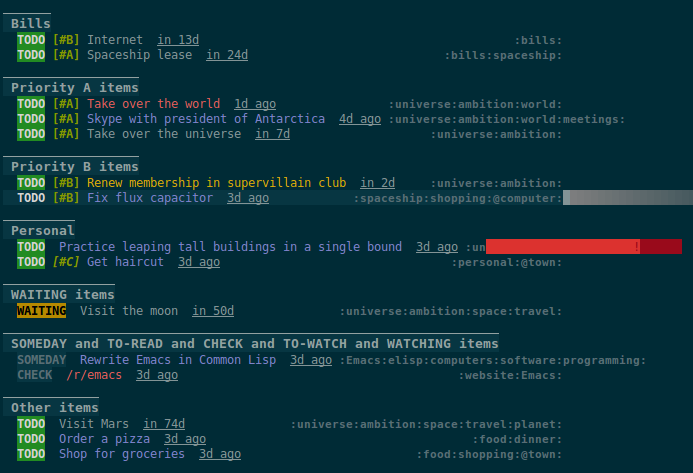
Note: The view buffer is currently put in org-agenda-mode, which means that some Org Agenda commands work, such as jumping to entries and changing item priorities (without necessarily updating the view). This feature is experimental and not guaranteed to work correctly with all commands. (It works to the extent it does because the appropriate text properties are placed on each item, imitating an Agenda buffer.)
Here are some other examples:
  ;; Show an agenda-like view of items in "~/org/main.org" with TODO and SOMEDAY keywords which are
  ;; tagged "computer" or "Emacs" and in the category "main":
  (org-ql-agenda "~/org/main.org"
    (and (todo "TODO" "SOMEDAY")
         (tags "computer" "Emacs")
         (category "main")))

  ;; Show an agenda-like view of all habits in all agenda files:
  (org-ql-agenda
    (habit))

  ;; Show an agenda-like view similar to a "traditional" Org agenda.
  (org-ql-agenda
    (or (habit)
        (date = today)
        (deadline <=)
        (scheduled <= today)
        (and (todo "DONE" "CANCELLED")
             (closed = today))))
Comparison with Org Agenda searches
Of course, queries like these can already be written with Org Agenda searches, but the syntax can be complex. For example, this query would be difficult to write in a standard Org Agenda search, because it matches against a to-do keyword and a plain-text search. As described in the advanced searching tutorial, it would require using org-search-view with a query with specific regular expression syntax, like this:
+lisp +{^\*+\s-+TO-READ\s-}
But with org-ql-agenda, you would write:
  (org-ql-agenda
    (and (regexp "lisp")
         (todo "TO-READ")))
More examples
More examples are available in /jiri/org-ql/src/commit/a3aac8466b5d095306f82b9b0dfb10c9afd046ab/examples.org.
org-sidebar
This package is used by org-sidebar, which presents a customizable agenda-like view in a sidebar window.
License
GPLv3