 9cce826bfe
By using s-join instead of org-agenda-finalize-entries, which does its own sorting. We don't need anything it does, at least not now, and if we ever do, we'll probably want to reimplement it, anyway. HOWEVER, this breaks org-super-agenda, which uses advice to that function to group items. So we need to either figure out another approach (which I have been unable to do so far, trying cl-letf, cl-flet, and advice-add with unwind-protect), or make this depend on org-super-agenda. |
||
|---|---|---|
| examples.org | ||
| notes.org | ||
| org-agenda-ng.el | ||
| org-ql.el | ||
| README.org | ||
| screenshot.png | ||

org-agenda-ng / org-ql
This is rudimentary, experimental, proof-of-concept alternative code for generating Org agendas. It doesn't support nearly as many features as org-agenda.el does, but it might be useful in some way. It uses some existing code from org-agenda.el and tries to be compatible with parts of it, like org-agenda-finalize-entries and org-agenda-finalize.
Here's an example of generating a kind of agenda view for today (note that the grouping is provided by org-super-agenda, not this code:
  (org-agenda-ng "~/src/emacs/org-super-agenda/test/test.org"
    (and (or (date = today)
             (deadline <=)
             (scheduled <= today))
         (not (done))))
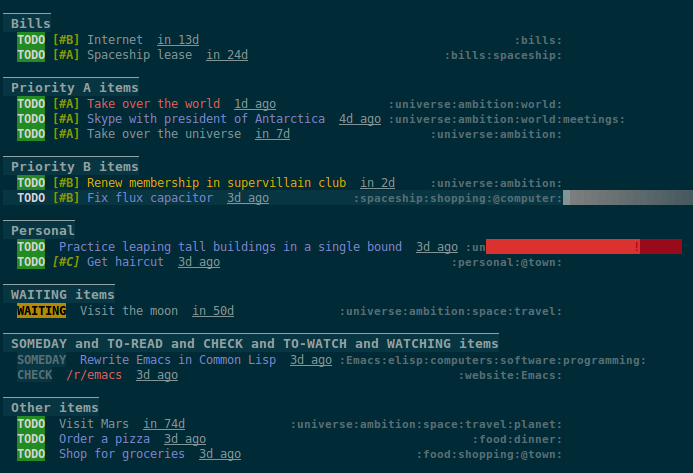
Here are some other examples:
  ;; Show an agenda-like view of items in "~/org/main.org" with TODO and SOMEDAY keywords which are
  ;; tagged "computer" or "Emacs" and in the category "main":
  (org-agenda-ng "~/org/main.org"
    (and (todo "TODO" "SOMEDAY")
         (tags "computer" "Emacs")
         (category "main")))

  ;; Show an agenda-like view of all habits in all agenda files:
  (org-agenda-ng
    (habit))

  ;; Show an agenda-like view similar to a "traditional" Org agenda:
  (org-agenda-ng
    (or (habit)
        (date = today)
        (deadline <=)
        (scheduled <= today)
        (and (todo "DONE" "CANCELLED")
             (closed = today))))
More examples are available in /jiri/org-ql/src/commit/9cce826bfe17e51c4c4e6a881c5ba601086393cd/examples.org.
org-ql
Another way to look at it is like a "query language" for Org buffers. For example:
  ;; Return a list of Org entry elements which have the SOMEDAY keyword, are tagged "Emacs", and have
  ;; priority B or higher:
  (org-ql "~/org/main.org"
    (and (todo "SOMEDAY")
         (tags "Emacs")
         (priority >= "B"))) ;; => ((headline (:raw-value "org-board" :begin 1220270 :end 1220403 ...)) ...)

  ;; Find non-done items which contain the term "Emacs" and have priority "B" or higher, and
  ;; return a list of heading positions:
  (org-ql org-agenda-files
    (and (not (done))
         (regexp "Emacs")
         (priority >= "B"))
    :action-fn (lambda (element)
                 (org-element-property :begin element)))  ;; => (44154 46469 56008 63965 100008 ...)

  ;; Or you can use mapcar around it to get the same result (API is WIP):
  (mapcar (lambda (element)
            (org-element-property :begin element))
          (org-ql org-agenda-files
            (and (not (done))
                 (tags "Emacs")
                 (priority >= "B"))))  ;; => (44154 46469 56008 63965 100008 ...)

  ;; If you kept a database of music in an Org file, you might run a query like this to find tracks
  ;; composed by Chopin that do not have their key recorded in the database:
  (org-ql "~/org/music.org"
    (and (property "genre" "classical")
         (property "composer" "Chopin")
         (not (property "key"))))
Instead of opening an agenda-like buffer with matching entries, org-ql can take a function as an argument that is called at each matching entry to return a result, and finally it returns a list of the results. For example, you could return a list of positions within the buffer, or a list of headings, or headings with entry contents, etc. By default, the matching element is returned, which is the result of calling org-element-headline-parser at that entry.
Results may also be sorted by a user-defined sorting function, or by some built-in sorters: date, deadline, scheduled, priority (which assume that the action-fn is the default, org-element-headline-parser). For example:
  ;; Return TODO items sorted by deadline, then priority.  These built-in sorters assume that items
  ;; are Org elements returned by `org-element-headline-parser' (the default action function).
  (org-ql "~/org/main.org"
    (todo)
    :sort (deadline priority))

  ;; Return TODO items sorted by user-defined sorting function.
  (org-ql "~/org/main.org"
    (todo)
    :sort #'custom-sort-fn)