 2ddc69b64d
Using org-agenda-mode isn't exactly *correct*, but since we use some compatible text properties, it does give us some functionality for free, even if it isn't 100% compatible. Note that this should be considered experimental. It's not unimaginable that using some agenda buffer commands in the agenda-ng buffer could have unexpected consequences, including data corruption. However, basic ones like jumping to entries and org-agenda-priority seem to work. |
||
|---|---|---|
| examples.org | ||
| notes.org | ||
| org-agenda-ng.el | ||
| org-ql.el | ||
| README.org | ||
| screenshot.png | ||

org-agenda-ng / org-ql
This is rudimentary, experimental, proof-of-concept alternative code for generating Org agendas. It doesn't support nearly as many features as org-agenda.el does, but it might be useful in some way. It uses some existing code from org-agenda.el and tries to be compatible with parts of it, like org-agenda-finalize-entries and org-agenda-finalize.
Here's an example of generating a kind of agenda view for today (note that the grouping is provided by org-super-agenda, not this code:
  (org-agenda-ng "~/src/emacs/org-super-agenda/test/test.org"
    (and (or (date = today)
             (deadline <=)
             (scheduled <= today))
         (not (done))))
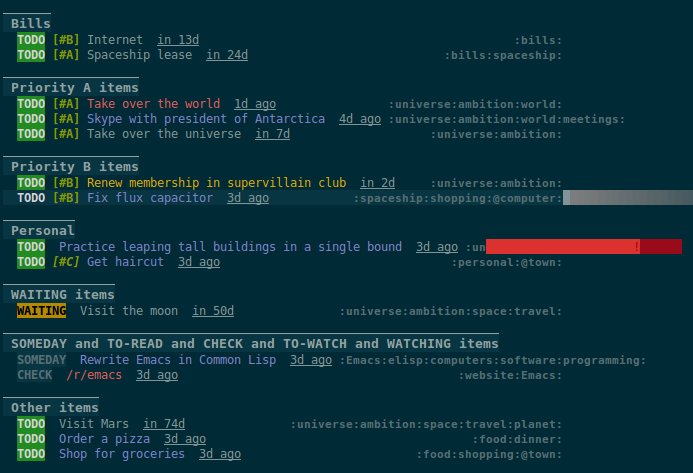
Here are some other examples:
  ;; Show an agenda-like view of items in "~/org/main.org" with TODO and SOMEDAY keywords which are
  ;; tagged "computer" or "Emacs" and in the category "main":
  (org-agenda-ng "~/org/main.org"
    (and (todo "TODO" "SOMEDAY")
         (tags "computer" "Emacs")
         (category "main")))

  ;; Show an agenda-like view of all habits in all agenda files:
  (org-agenda-ng
    (habit))

  ;; Show an agenda-like view similar to a "traditional" Org agenda:
  (org-agenda-ng
    (or (habit)
        (date = today)
        (deadline <=)
        (scheduled <= today)
        (and (todo "DONE" "CANCELLED")
             (closed = today))))
More examples are available in /jiri/org-ql/src/commit/2ddc69b64d38f8637e4be9bc1c59ab9bf04482b6/examples.org.
org-ql
Another way to look at it is like a "query language" for Org buffers. For example:
  ;; Return a list of Org entry elements which have the SOMEDAY keyword, are tagged "Emacs", and have
  ;; priority B or higher:
  (org-ql "~/org/main.org"
    (and (todo "SOMEDAY")
         (tags "Emacs")
         (priority >= "B"))) ;; => ((headline (:raw-value "org-board" :begin 1220270 :end 1220403 ...)) ...)

  ;; Find non-done items which contain the term "Emacs" and have priority "B" or higher, and
  ;; return a list of heading positions:
  (org-ql org-agenda-files
    (and (not (done))
         (regexp "Emacs")
         (priority >= "B"))
    :action-fn (lambda (element)
                 (org-element-property :begin element)))  ;; => (44154 46469 56008 63965 100008 ...)

  ;; Or you can use mapcar around it to get the same result (API is WIP):
  (mapcar (lambda (element)
            (org-element-property :begin element))
          (org-ql org-agenda-files
            (and (not (done))
                 (tags "Emacs")
                 (priority >= "B"))))  ;; => (44154 46469 56008 63965 100008 ...)

  ;; If you kept a database of music in an Org file, you might run a query like this to find tracks
  ;; composed by Chopin that do not have their key recorded in the database:
  (org-ql "~/org/music.org"
    (and (property "genre" "classical")
         (property "composer" "Chopin")
         (not (property "key"))))
Instead of opening an agenda-like buffer with matching entries, org-ql can take a function as an argument that is called at each matching entry to return a result, and finally it returns a list of the results. For example, you could return a list of positions within the buffer, or a list of headings, or headings with entry contents, etc. By default, the matching element is returned, which is the result of calling org-element-headline-parser at that entry.
Results may also be sorted by a user-defined sorting function, or by some built-in sorters: date, deadline, scheduled, priority (which assume that the action-fn is the default, org-element-headline-parser). For example:
  ;; Return TODO items sorted by deadline, then priority.  These built-in sorters assume that items
  ;; are Org elements returned by `org-element-headline-parser' (the default action function).
  (org-ql "~/org/main.org"
    (todo)
    :sort (deadline priority))

  ;; Return TODO items sorted by user-defined sorting function.
  (org-ql "~/org/main.org"
    (todo)
    :sort #'custom-sort-fn)